 monthlet
HelpBrowsing and looks
Themes (color tokens, headings, dark mode, AI generation, export)
Describes monthlet 1.3.1.
In Settings → Appearance you switch the "theme". It decides a note’s whole look (colors, typography, dimensions, block styling) at once. Five presets (Corporate / Editorial / Docs / Playful / Accessible) appear as cards with light/dark swatches; click a card to make it the default for all notes. A folder or an individual note can override it. Exported .html reflects the theme too.
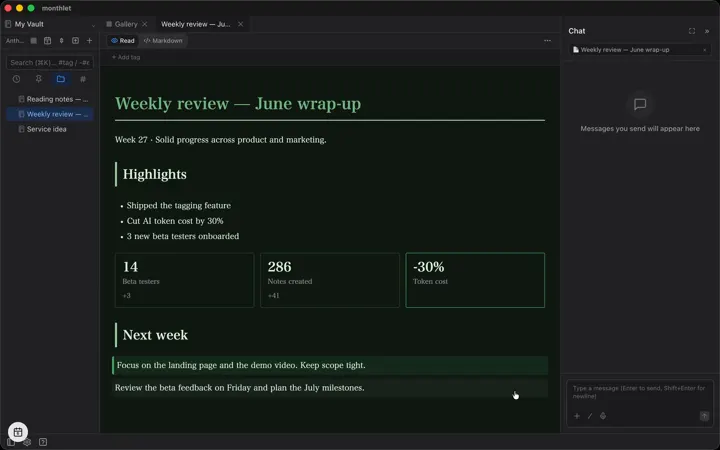
monthlet’s idea: blocks carry "meaning" and the theme decides the "look". Colors are specified as meaning-based tokens (primary / accent / success / warning / danger, etc.) rather than literal color values, so changing the theme recolors everything at once.
■ Dark mode: Settings → Appearance → “Appearance” switches the whole app (sidebar, chat and other chrome) between Light / Dark / System (follows the OS). Note bodies follow the same setting via each theme’s light/dark pair. Exported .html follows the reader’s OS when opened in a browser.
■ Presets are read-only (duplicate to edit): presets cannot be edited directly. To customize, click "Duplicate" on a card — a copy is made and the editor opens on it.
■ Editor (duplicate to edit / "Edit" on a custom system): adjust colors (separate light/dark), typography (font, size, line height), dimensions (radius, spacing, shadow), and block personality (heading band/underline, callout/card/table/quote/divider/code styles) in a layered form. The preview on the right updates live with a light/dark toggle — no CSS required.
■ Use fonts installed on your computer: in Settings → Appearance, under "App display", search the fonts installed on your computer and pick one for the app text, then choose its "Weight" (only the weights that font has are listed). For notes, use "Font for Sans", "Font for Serif", "Font for Mono" and "Body weight" in the editor. On a device that does not have the font, a standard typeface is used instead.
■ Make one with AI: in "Create a theme with AI", describe a mood (e.g. calm dark green / warm washi-like reading style) and AI generates a theme with chosen colors, typography, and styling. Fine-tune it in the editor afterward.
■ Headings: a note’s title is its first heading (H1). The theme decides the H1/H2/H3 style (plain / underline / band / accent bar) and whether the H1 is a full-bleed band.
Videos
monthlet is free on macOS and Windows.
Download monthlet