 monthlet
monthlet is a note app where you write and grow notes through AI chat. Version 1.2.0 was released on October 30, 2026. The Windows build is also at 1.2.0 on the Microsoft Store.
1.2.0 expands what external agents (MCP) can do. This post gives a short tour of the main additions and shares an update to the roadmap. The full set of changes is in the release notes.
Deletion from external agents
In Settings, Publish to external agents on the Connectors tab has a new switch, Allow deleting. It is off by default. Turned on together with Allow writing, it lets an external agent delete notes and folders, and merge several notes into one.
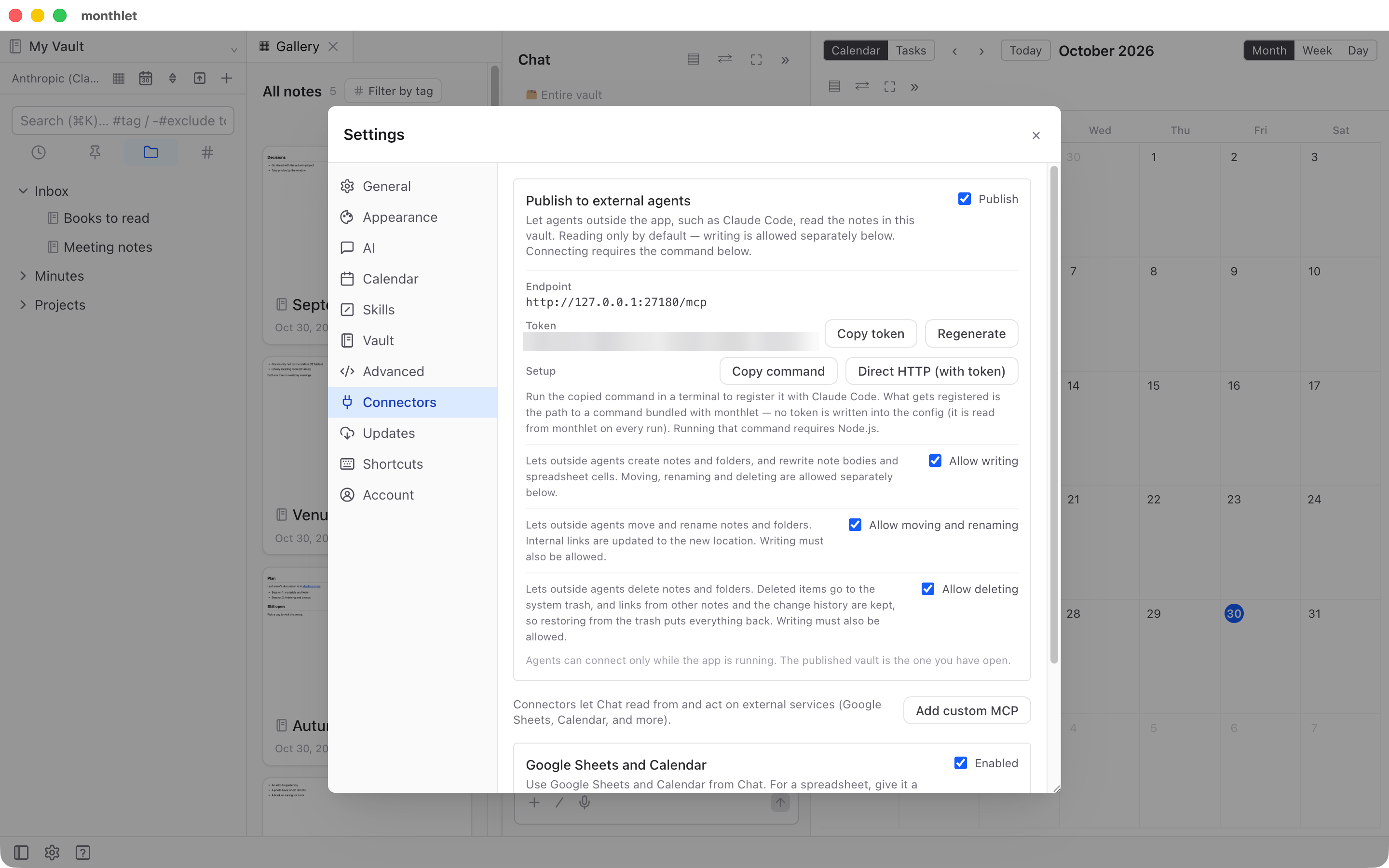
Deleted notes and folders are moved to the OS trash. Links from other notes and the change history are kept, so restoring an item from the trash brings it back as it was. Notes with unsaved changes are not deleted. The switch only takes effect on the device where you turn it on.
Spreadsheet editing
External agents can now change cell values, formulas, and formatting in spreadsheets. Formulas are recalculated before saving, and any charts and kanban boards connected to that spreadsheet are updated at the same time.
The version before the edit is kept in the change history. Spreadsheets with unsaved changes are not edited. This operation becomes available when Allow writing is turned on in Publish to external agents.
Other changes
Among the fixes, these are the ones you are most likely to notice in daily use.
-
Pressing Enter to confirm a conversion in Japanese input no longer also confirms the field you are typing in, such as a note’s name or search.
-
Renaming a note you are editing no longer reverts the rename.
-
English words and numbers written directly after Japanese text are now found in search. For example, a note containing 今日はmonthletを使った (“I used monthlet today”) is found by searching for “monthlet”.
-
Notes added or changed outside monthlet are now picked up by search, the task list, the calendar, and the tag list when you return to the monthlet window. Previously this required a restart.
-
A quick capture of two or more lines is now saved with each line as its own paragraph.
-
When the AI makes changes to an open note in several passes, the second and later passes are now applied as well.
-
Token estimates shown before sending now follow the counting method of the AI provider you are sending to.
The handling of AI instructions has also changed. Instructions that come from someone else’s vault or from another device are not sent to the AI until you confirm them on this device. Until you do, a notice appears above the chat.
Roadmap update
Since October 26, the roadmap page on monthlet.ai lists planned work with version numbers. Once a feature ships, it moves from the release notes into the shipped list. The main plans per version are:
-
1.2.1 (November 2026): switching AI provider and model from the chat field; buttons for inserting tables and lists in Markdown editing
-
1.3.0 (November 2026): import from Evernote; side-by-side notes and separate windows
-
1.4.0 (November 2026): import from Apple Notes (Mac only); recurring tasks
-
1.5.0 (December 2026): pass a URL to save a web page into a note, body text and images included
-
1.6.0 (December 2026): semantic search for notes close in meaning; printing with a choice of paper size, orientation, and margins
-
Q1 2027: general availability of monthlet AI; iPhone version 1.0
Everything on the roadmap is a plan and may change. When a new version ships, its main features will be covered in this journal.
Try it
monthlet runs on macOS (Apple Silicon) and Windows. The Windows build is available on the Microsoft Store. The features described here are in 1.2.0. Entering your own AI API key gives you access to all features.