 monthlet
monthlet is a note app where you write and grow notes through AI chat. If you already have a pile of Markdown notes, the first question when trying another app is what happens to them. Markdown import has been in monthlet since the first distributed version. You pick one folder, and the notes inside it are converted together.
This journal walks through what gets imported and how. The examples use notes written in Obsidian, but this isn’t an argument for leaving Obsidian. monthlet can export back to Markdown, so you can try it while keeping a way back.
Two entry points, one screen
There are two places to start an import: the import button at the top of the sidebar, and the “⋯” menu at the top right of an open note. Both are labeled “Import Markdown / Excel (file / folder)” and open the same picker.
In that picker you can choose a file or a folder. Pick a file and only that file is imported. Pick a folder and everything inside it is imported in one pass.
Choosing a folder opens “Import Markdown folder”. Choose the “Destination folder” and press “Start import”. While it runs, it shows how many files of the total have been processed and which file is being handled right now. You can stop partway through, and the notes imported up to that point stay.
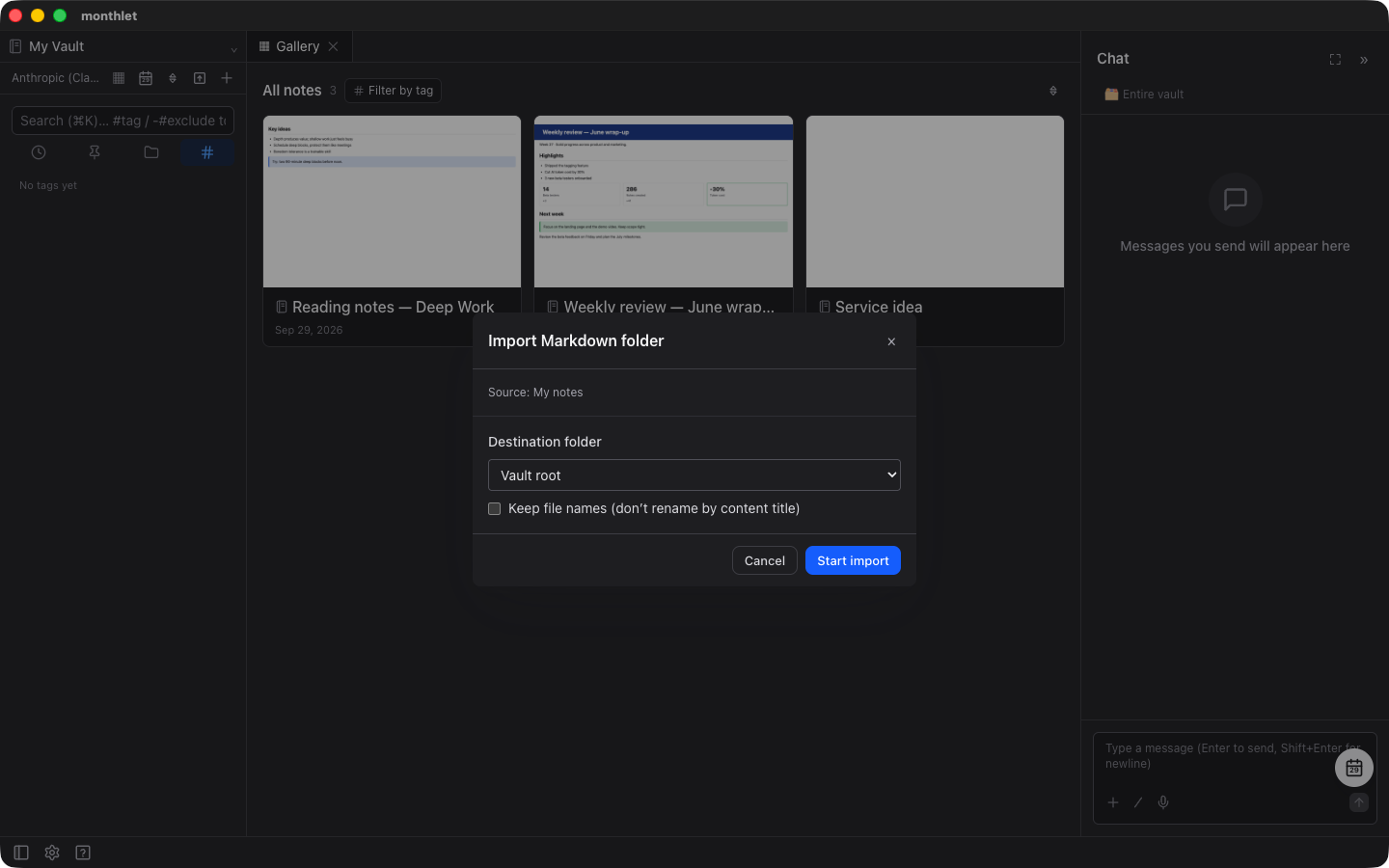
Files with the extensions .md and .markdown are imported. Folders whose names begin with a dot are not traversed, so configuration folders such as .obsidian are left out.
One import handles up to 5,000 files, and each file can be up to 10MB. If you go over either limit, monthlet tells you before the import starts, so you can split the folder and import in parts. It won’t hit a limit halfway and leave you with a partial import.
The hierarchy is preserved
The folder you picked is recreated by name inside the destination, and the original subfolder structure is reproduced underneath it. Daily/2025.md ends up at Daily/2025.html. Nothing is flattened into a single place.
If a note with the same name already exists in the destination, the imported note is saved under a numbered variant of the name. Existing notes are not overwritten.
Turn on “Keep file names (don’t rename by content title)” and notes are not renamed after the title in the body; the original file name is kept. If you write a journal with dates as file names, that is the one you want.
The import does not go through AI
Since monthlet runs on your own API key, “what will 1,000 files cost me?” is a fair question.
The import does not call AI. It uses no API tokens at all.
What does the work is a Markdown parser. Headings become headings, tables become tables, code becomes code — fixed rules, and the body text is never sent to a model. Whether it’s one file or 5,000, the only cost is time.
Reading Obsidian’s conventions
Beyond plain Markdown, monthlet also converts the conventions commonly used in Obsidian.
Links written as [[Note name]] become monthlet internal links, and clicking one opens that note. The alias form [[Note name|Alias]] keeps its alias, and [[Note name#Heading]] drops the heading part and links to the note itself.
Links are resolved after every note has been created, because before that it isn’t settled which file each link target becomes. Thanks to that order, notes inside the imported folder that point at each other are connected correctly afterwards. Links to notes that already exist in monthlet are looked up the same way.
When no note with a matching name is found, the bracketed text is left in the body as-is. Removing it would make it impossible to tell which links are unresolved.
Nested bullet lists are merged into a single list with the child items indented. All of the item text is kept, but the hierarchy is not.
Images, quotes and diagrams
Embeds written as ![[image.png]] are located in the import source, copied into the note’s folder and displayed as images. Video and audio work the same way. Files such as PDFs become links you can click to open. Images attached with standard Markdown syntax are also copied and re-attached the same way (this has been the case since v0.17.1). When the actual file can’t be found, either syntax leaves just the image’s position in place and adds to the count of missing references.
Annotations placed inside a quote become monthlet callouts. monthlet has five callout types, so Obsidian’s finer-grained types are mapped onto those five. Anything without a match comes in as the default type. If the title was omitted, the type name is imported as the title. Ordinary quotes stay ordinary quotes.
mermaid code blocks become diagram blocks when they are flowcharts or mind maps, and node shapes and arrow labels carry over. Other mermaid syntaxes are imported as code blocks.
Frontmatter and tags
From the frontmatter at the top of a file, monthlet reads the title, tags, creation time, update time, pinned state and archived state.
Other keys are not discarded. Keys monthlet doesn’t know the meaning of, such as aliases or status, are kept as they are. When you export back to Markdown the same keys come back, so importing and exporting doesn’t lose metadata.
One caveat: only the tags key in frontmatter becomes tags. Tags written inline in the body with a # are not registered as tags. They remain in the body as text, so nothing is lost.
The import result
When the import finishes, monthlet shows the result: the number “Imported”, a list of any files that failed along with the reason, and the number of “Missing references” — images and other files that couldn’t be found.
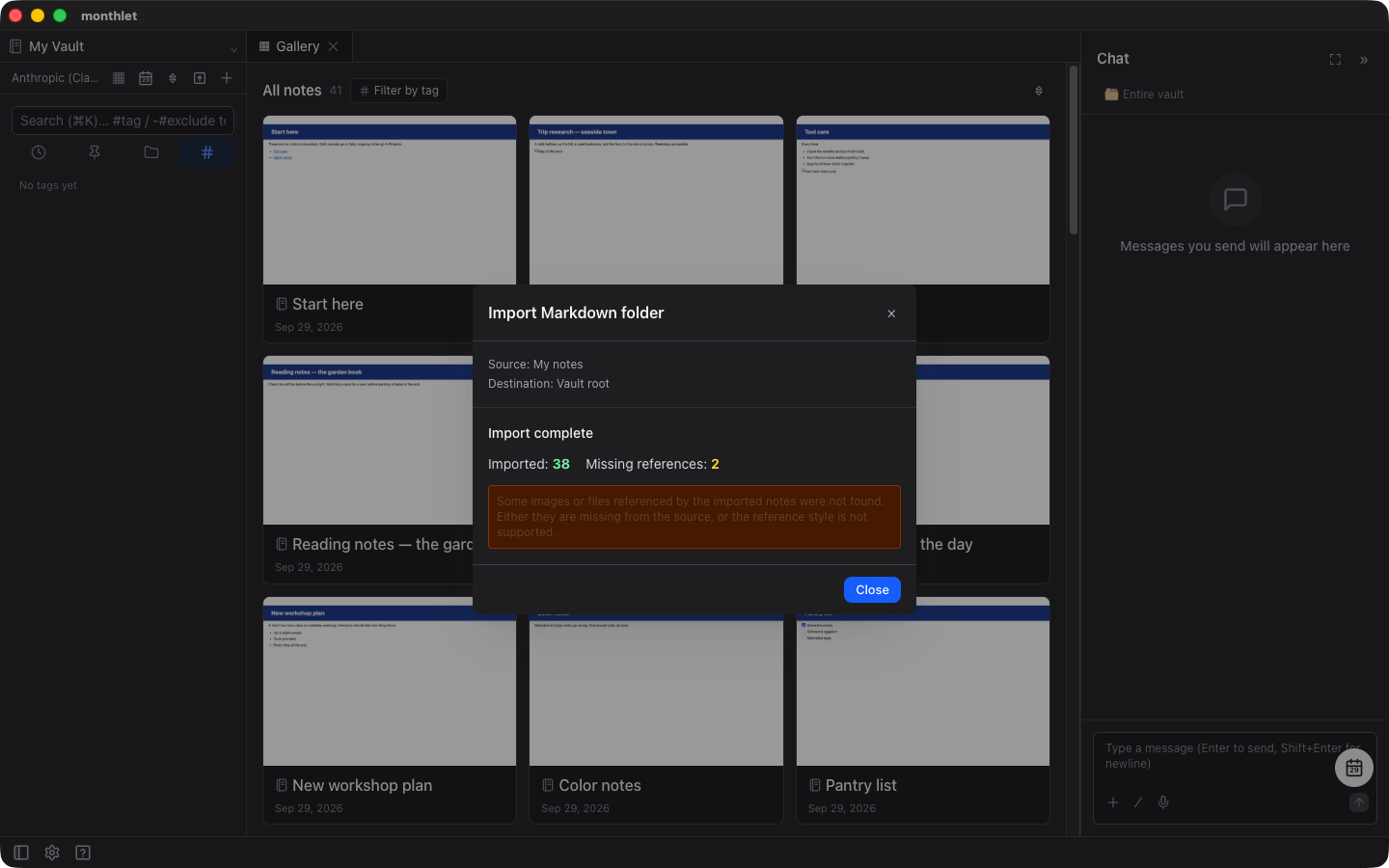
That last count means the note itself was imported, but the image or other file its body points to couldn’t be located. Open the note and the attachment area at the bottom marks it as “Missing”, so you can re-attach it from there.
The count covers both the ordinary form with a path in parentheses and the Obsidian double-bracket form; there’s no difference between the two syntaxes (up to v0.18.1 the double-bracket form was not counted and stayed in the body as text).
Showing only the “Imported” count would make an import look fine even when not all images were connected, so both numbers appear on the same screen (this display has been there since v0.17.1).
Try it
monthlet is currently distributed for macOS (Apple Silicon). Enter your own AI API key and all features are available.
-
Download: https://monthlet.ai/download
-
Discord: https://discord.gg/aP4Hc7cJGU