 monthlet
monthlet is a note app where you write and grow notes through AI chat. Each note is a single ordinary HTML file that also opens in a browser.
monthlet is developed by one person, and most of the coding work is handled by Claude Code. The work is currently split into four lanes, each running as a separate session in its own terminal, in parallel. This article describes how that setup works: how the Git repositories are divided, where the CLAUDE.md files live, the rules for which file is authoritative, and the loop that lets a lane keep working without waiting for human instructions.
A parent folder and three repositories
All work happens inside a single parent folder. Inside it sit three repositories — the app itself, the website, and the server-side API — and the parent folder is a repository too.
The parent repository tracks only CLAUDE.md and the .claude folder. The three child repositories are excluded, so all that remains in the parent are the rules and settings for Claude Code to read. Since this is where personal settings live, commits go straight to main without pull requests.
In every lane, Claude Code starts in this parent folder. Claude Code reads configuration only from the .claude directly beneath the folder it was started in; it does not walk up to parents or down into children. Work often spans all three repositories, so the starting point is fixed at the parent, and the permission settings, hooks, and skills for all three are collected in the parent’s .claude. The actual hook scripts live inside each repository, and the parent only calls them.
CLAUDE.md in two layers
There is one CLAUDE.md in the parent and one in each repository.
The parent CLAUDE.md holds the rules that apply across repositories: the folder structure, the four lanes and where each one is allowed to write, Git practices, how to read GitHub, and so on. Per-repository rules are not copied here. The parent file only points at them, saying to read that repository’s CLAUDE.md before starting work.
A repository’s CLAUDE.md holds the things you will get wrong if you do not know them when working there. For the app, that means the design commitments (for example, file reads and writes happen only in the main process) and the rule that any change to a feature must fix the help text in the same pull request. The website and server CLAUDE.md files state plainly that merging ships to production immediately.
Long procedures are split out into separate documents, and CLAUDE.md keeps only a table of which document to read for which kind of work, which keeps down how much Claude Code reads every time.
The four lanes
The lanes are:
-
P (Product): the app repository. Actually launching the app to verify behavior, and taking screenshots, happens only in this lane.
-
W (Web): the website and server API repositories. Both go live in production at the moment a change is merged.
-
M (Marketing): drafts and plans in Obsidian, plus GitHub Issues. This lane does not edit repository files.
-
HQ (Coordinator): GitHub Issues and Projects only. Its job is assigning work, keeping states tidy, and collecting the items waiting on a human decision. It does not do the work itself.
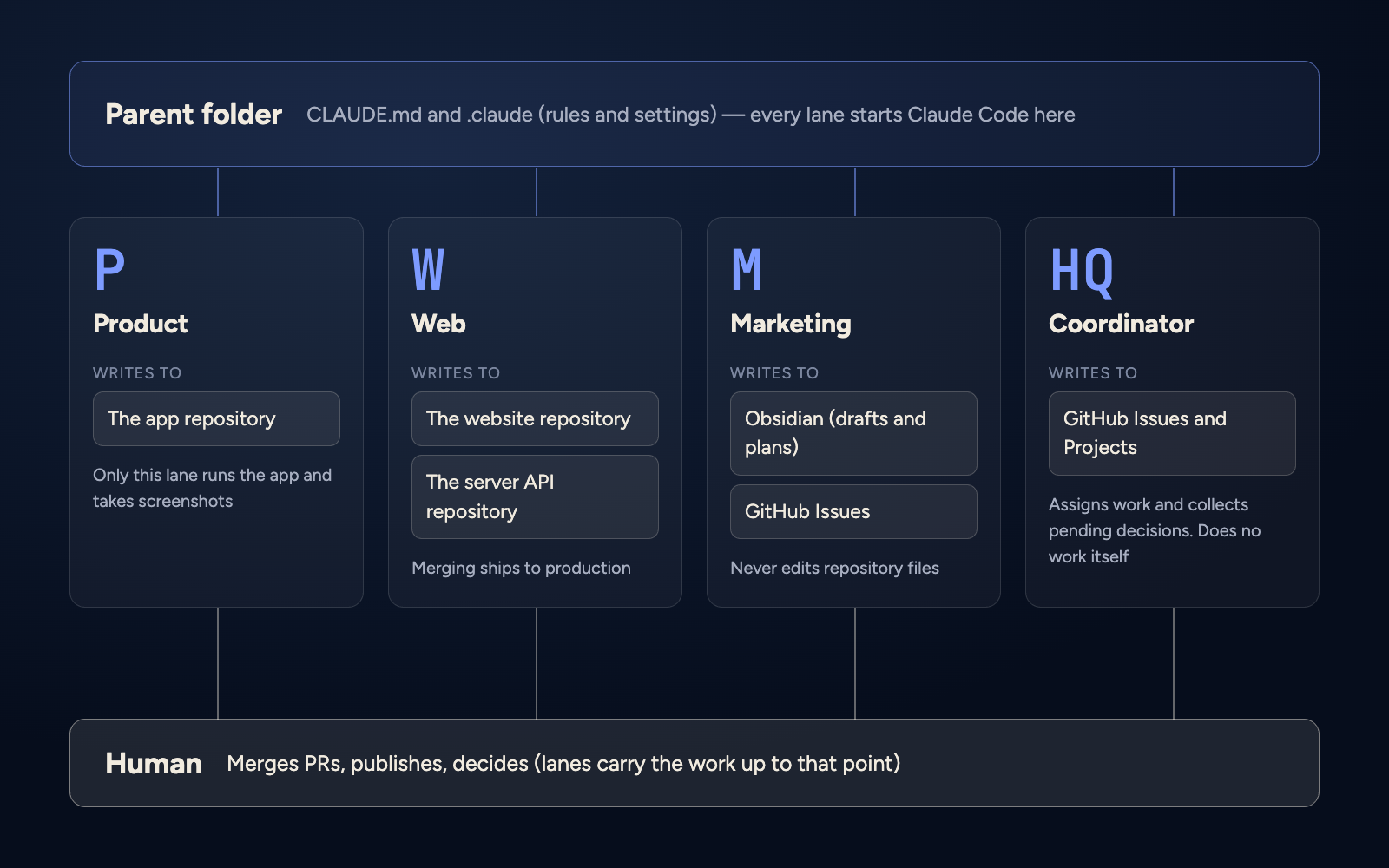
Launching the app is limited to P because only one process can hold the development server and the app’s data lock.
Heavy work is handed from a lane to a subagent: article drafts, channel research, issue triage, code investigation. The draft of this article was handed from the M lane to a drafting subagent.
One lane per repository
Running in parallel depends on one rule: at most one lane may hold uncommitted changes in a given repository. There is only one working tree per repository, so if two lanes write to the same place, the changes get mixed together.
For example, if M is working and the website copy needs a change, M does not fix it. It files an issue in the website repository and hands it to W. The parent repository works the same way: the lane editing it writes “editing” in its own status file and checks that no other lane has made the same declaration before touching anything. Files added to a commit are specified one path at a time.
Merging pull requests is the human’s job. The merge command is blocked by a hook. The exception is a pull request that only changes documents or scripts that never appear on the site; if conditions such as a passing CI are met, those may be merged through a dedicated script.
Which file is authoritative
If the same thing is written in two places, one of them eventually goes stale. So for each kind of information, exactly one place is authoritative:
-
Tasks: GitHub Issues and Projects
-
Product specs, technical design, shipping order: the
devfolder in Obsidian -
Landing page copy, article candidates and drafts: the
go-to-marketfolder in Obsidian -
Reasons behind small implementation decisions: pull request bodies and commits
-
Structure of each repository: that repository’s README
-
Permission settings:
settings.jsonin the parent’s.claude -
Current state of a lane: that lane’s status file
The same applies inside Obsidian. For journal articles, the state of each article is written only in a table called note-status.md, one line per article. Idea lists and history files do not record states like “done” or “remaining.” If there are two places that record state, one of them will be left stale.
The split between repositories and Obsidian follows the same thinking. The server repository’s CLAUDE.md states that the authoritative design lives in Obsidian and is therefore not included in the repository.
Status files
Each lane writes what it is currently doing into a six-line status file:
-
as-of: the time it was written (UTC)
-
session: its own session name
-
now: current work
-
next: what comes next
-
waiting: what it is waiting on (whose, and what)
-
human (verbatim): decisions received from the human, in their original wording
It is rewritten at checkpoints: on startup, when starting a task, when opening a pull request, when stopping, and when receiving a human decision. HQ reads this file before asking a lane for its state, and only sends a message if as-of is more than two hours old or the file is missing.
Human decisions are kept verbatim so they can be distinguished from paraphrases that arrived by way of another lane. For a decision that exists only as a paraphrase, the rule is not to proceed with irreversible operations.
Status files are not tracked in Git. Tracking them would only add a commit on every update, so instead every lane on the same machine points at the same location.
Communication between lanes uses Claude Code’s session-to-session messages. Typing something like lane P in a terminal starts that lane, and because the session name becomes the lane name, messages can be addressed by that same name.
Pulling from a queue
Previously, each lane proposed its work for the day and waited for human approval before proceeding. Approved work finished quickly, and every time a lane went idle the human had to hand over the next task. Now lanes pull work from a queue without waiting for approval.
For P and W, the queue is issues labeled lane:P or lane:W. Server-side work is filed as issues in the app repository by convention, so W watches two repositories: the website and the app. M watches the next step recorded in the article status table and issues labeled lane:M. HQ applies the labels, and keeping the queues from running empty is HQ’s job.
The pull order is: nearest deadline first, then whatever can be carried through to a merge, then lowest issue number. Before taking an issue, a lane reads the body and all comments to the end and checks whether the work has already been implemented, then leaves a one-line comment that it has started, so two lanes do not pick up the same issue.
Whether something may proceed without approval is decided by two questions: is it reversible, and does it go outside? Implementing and testing on a branch, draft pull requests, research, Obsidian drafts, and filing issues are all on the “proceed” side. Merging pull requests, publishing releases, posting to the journal or X, sending email, external service admin panels, secrets, and article titles and publication dates are the human’s turn. The lane comments on the issue, writes it into waiting in its status file, and moves on to the next item instead of stopping.
There are four conditions for stopping: the queue is empty, everything remaining is the human’s turn, five draft pull requests are piled up awaiting human review, or remaining context is low. When stopping, the lane writes a one-line reason into now in its status file, and HQ reads it and adds more work. A lane never asks the human “what should I do next?”
One day’s flow
On the morning of September 29, after publishing the article about importing Obsidian notes, the flow went like this.
The human published it. M then checked the published text and pulled the edits the human had made before publishing back into the draft in Obsidian. W prepared a pull request with the translation for the English blog, and P captured two screenshots in the English UI. M inspected those images, W dropped the ones that passed into the pull request, and finally the human merged it and the English version went live.
Handoffs between lanes went through session-to-session messages and issues, and progress was recorded in each lane’s status file. In this flow, the human’s turn came twice: publishing the article, and merging the pull request. When items need a decision, HQ collects them in one place and hands them to the human.
Try it
monthlet runs on macOS (Apple Silicon) and Windows. The Windows version is available from the Microsoft Store. Enter your own AI API key and every feature is available.